
Windows → Linux
Get Linux on your OMEN
OmenPrep dumps your ACPI tables on Windows, patches them, and bakes the fix into a Linux install ISO - so first boot isn't a firmware wrestling match.
What you need
- HP OMEN laptop still running Windows
- A stock Linux ISO (Fedora, Ubuntu, or Arch preferred)
- USB stick, 8 GB or larger
- Rufus, Etcher, or
ddto flash
How it works
Grab OmenPrep
Download the Windows exe from Releases. You need the OMEN on Windows, a stock Linux ISO, and an 8GB+ USB stick.
Run OmenPrep on the laptop
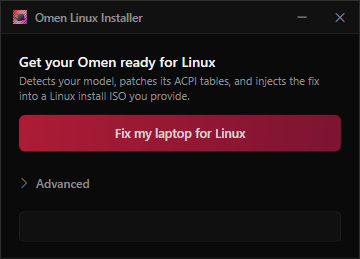
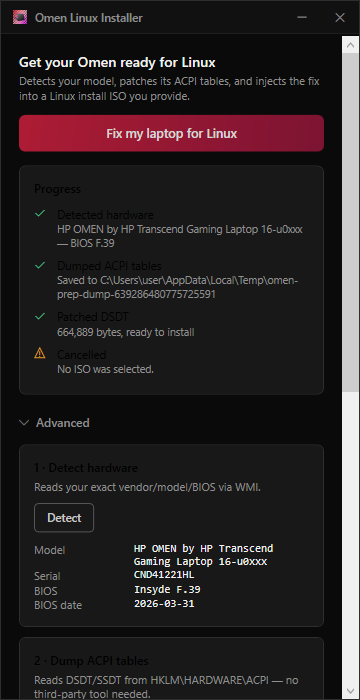
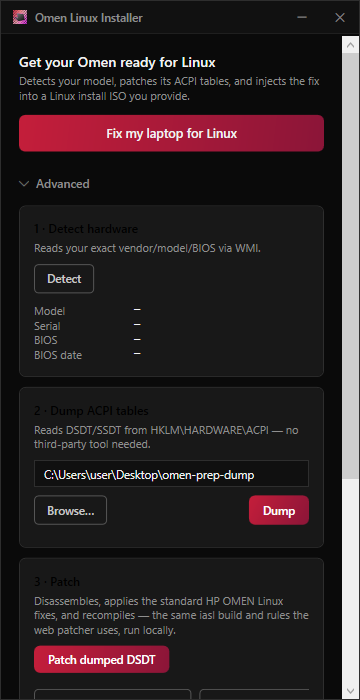
You're reading this on the site - the actual work happens in the Windows app. Open OmenPrep, hit Fix my laptop for Linux, pick your ISO, and save the -omen.iso. Same DSDT patches as the online tool, baked into the install media.
Flash in DD mode
Write that file to the USB with Rufus (DD mode), Etcher, or dd. Hybrid images break if you use ISO mode in Rufus.
Install normally
Boot the stick in UEFI (Secure Boot off for the first install is easiest). Install Fedora, Ubuntu, or Arch like any other machine.
Lock it in
Before you leave the live session - and once more after reboot - run the scripts from the stick so ACPI survives and RGB can build.
After install - don't skip this
Still in the live session, with your new root mounted at /mnt, run the ACPI apply script from the stick. Paths differ by distro - Ubuntu often has the ISO at /cdrom; Fedora usually under /run/media.
Live session
Stages the patched DSDT and GRUB/initrd hooks so the first boot into the installed system already carries the ACPI override.
# Ubuntu live
sudo bash /cdrom/apply-omen-acpi.sh /mnt

# Fedora live
sudo bash /run/media/$USER/*/apply-omen-acpi.sh /mnt
Installed system
Reboot into Linux, mount the USB again, then run post-install. That locks ACPI for future kernels, tries to un-stick Intel from simpledrm on newer Fedora, and builds the RGB DKMS module when headers exist.
sudo bash /run/media/$USER/*/post-install-omen.sh
# Ubuntu-ish:
sudo bash /media/$USER/*/post-install-omen.sh
Flags if you only want one piece: --acpi-only, --rgb-only, --gpu-only.
Did it work?
After one more reboot, check that the kernel loaded the upgraded DSDT and that the RGB platform device is there.
BIOS notes
Esc / F10 into setup: UEFI boot, Secure Boot off at least until things work. F9 for the one-shot boot menu if the stick doesn't show up.
Common problems
- No EFI entry / stick won't boot
- Reflash with Rufus DD mode. Don't reuse an old
-omen.iso- patch again from the original ISO with a current build. - GRUB can't find /boot, or live crashes
- Same fix: fresh patch + DD flash.
- RGB missing
- Need
kernel-devel/ headers matchinguname -r. Try--rgb-only. Secure Boot may want a MOK enrollment for DKMS. - Desktop runs like a slideshow (Fedora)
- Intel stuck on
simpledrm. Run--gpu-only, reboot, checklspci -nnkfori915. - NVIDIA
- Install
akmod-nvidiafrom RPM Fusion yourself. Panel is usually on Intel; dGPU is offload - not something this tool handles.
More
Stuck mid-install? Ask on Discord or open an issue on the installer repo. Already on Linux and only need a DSDT? Use the browser ACPI patcher.