
Desktop app
OMEN Gaming Hub
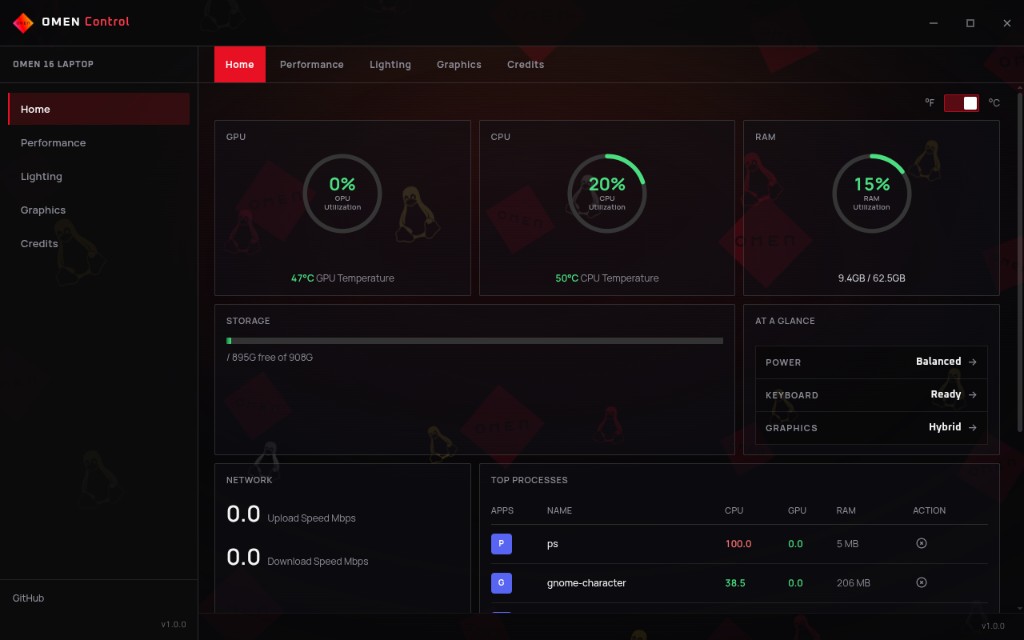
Community control panel for HP OMEN on Linux - keyboard RGB, fans / thermal modes, graphics switching, and system vitals. Companion app for the omen-rgb-keyboard driver. Not an HP product.
What it does
Lighting
Four-zone RGB, brightness, and driver animation modes with a live keyboard preview.
Performance
Thermal / power profiles and fan control when the omen-rgb-keyboard sysfs interface is present.
Graphics
optimus-manager mode switching plus setup / repair helpers (Fedora-friendly).
Home
Temps, utilization, storage, network, and top processes in one place.
What you need
- Linux (primary) - AppImage recommended; .deb also published
- omen-rgb-keyboard kernel driver for RGB and fan / thermal sysfs
- optimus-manager optional - only for hybrid graphics switching
Get running
Grab the Hub
Download the AppImage from Releases (best for in-app updates). A .deb and a Windows installer are also published.
Install the kernel driver
RGB and fans need omen-rgb-keyboard. Clone it, sudo make install, then optional udev rules for non-root sysfs. The Hub can also walk you through this when sysfs is missing.
Launch and tune
Open the Hub, set lighting and fans from the UI instead of hand-editing sysfs. Optional: install optimus-manager if you want hybrid graphics switching.
Launch the AppImage
Prefer the AppImage if you want automatic updates from inside the app. Make it executable, then run it.
First run
The Hub checks for the driver sysfs and opens the control panel when things look healthy.
chmod +x OMEN-Gaming-Hub-*.AppImage
./OMEN-Gaming-Hub-*.AppImage
Kernel driver
RGB and fan features need the platform driver. You can install it from a terminal, or let the Hub walk you through it from the welcome / driver UI when sysfs is missing.
Install
Headers must match uname -r. Secure Boot may want a MOK enrollment for DKMS.
git clone https://github.com/OmenLinux/omen-rgb-keyboard.git
cd omen-rgb-keyboard
sudo make install
sudo ./install-udev-rules.sh
Did it work?
After the driver is loaded, the Hub talks to the same sysfs nodes you would poke by hand. Quick sanity check:
Support scope
This is community software for HP OMEN on Linux - as-is, not affiliated with HP. Maintainers cannot support every laptop model, BIOS, kernel, distro, or desktop environment. If something fails because of HP firmware, missing WMI, an unsupported machine, or a broken Optimus / display-manager setup, it may not be fixable in the app. Report firmware issues to HP when appropriate.
Common problems
- No RGB / fans in the Hub
- Install omen-rgb-keyboard, match
kernel-develtouname -r, reboot, then reopen the Hub. - Graphics switching missing
- Needs a working optimus-manager setup. The Hub can help on Fedora-ish systems; it cannot invent hybrid GPU support HP never shipped for Linux.
- AppImage won't run
chmod +xthe file. Some sandboxed file managers strip the exec bit - run it from a terminal. Prefer AppImage over .deb if you want in-app updates.- Still on Windows
- Use the OmenPrep installer guide to get Linux on the machine first, then come back for the Hub.
More
Questions or model reports? Ask on Discord or open an issue on the Hub repo.